
EF Portal 2025.3 is now available, introducing a step forward in secure access, user observability, and operational robustness for HPC and remote desktop environments.
This release focuses on simplifying how users access web-based tools running on compute nodes, while giving administrators finer control and better visibility across interactive and batch workloads.
What’s new in EF Portal 2025.3
With EF Portal 2025.3, access becomes simpler, security tighter, and observability stronger. The new web proxy lays the groundwork for exposing modern web tools safely, while dashboard and VDI improvements continue to reduce operational friction for both users and administrators.
Transition to EF Portal
If you’re using EnginFrame, it can be very beneficial transition to EF Portal, the next evolution of the powerful HPC and VDI portal platform. Built on the same code base as EnginFrame, EF Portal offers a familiar installation process, consistent user experience, and exciting new features designed to enhance productivity and performance. As part of NI SP’s commitment to supporting EnginFrame customers, we offer free migration options and ongoing support to ensure a seamless upgrade experience.
Ready to try EF Portal or upgrade EnginFrame to EF Portal? Contact us for support.
⬇ Read full “What’s New in EF Portal 2025.3” below ⬇
What’s New in EF Portal 2025.3
(PDF Version: What’s New in EF Portal 2025.3)
EF Portal Web Proxy
The EF Portal Web Proxy provides a secure, centralized entry point for accessing web‑enabled applications running on compute nodes, such as JupyterLab, Web terminal and DCV. Instead of requiring users to connect directly to multiple node ports (e.g., node1:8443, node2:8891), all traffic is funneled through a single, consistent EF Portal host and port. This greatly simplifies access and improves overall network security.
The Web Proxy listens on a single PROXY_PORT and acts as a reverse proxy, routing incoming HTTP, HTTPS, and WebSocket traffic to the correct backend host and port based on the request path.
Both static and dynamic routing patterns are supported, allowing the proxy to handle fixed endpoints as well as applications running on different nodes and ports.
Typical use cases include exposing JupyterLab and DCV sessions through stable, user‑friendly URLs – without opening additional ports on compute nodes or exposing them directly to users.
Routing rules are defined in $EF_TOP/conf/proxy/proxy-config.yaml.
The proxy can route requests statically (fixed host/port) or dynamically (host and port extracted from the URL).
Here an example for accessing JupyterLab servers and Notebooks via the Web Proxy.
Example: Dynamic Jupyter routing
The proxy supports multiple Jupyter instances running simultaneously on different nodes and ports. To reach each session, you can use for example a path of the form: /jupyter/<hostname>/<port>
Example of $EF_TOP/conf/proxy/proxy-config.yaml configuration:
proxies:
path: "^/jupyter/[^/]+/[0-9]+"
hostRegex: "^/jupyter/([^/]+)/[0-9]+"
portRegex: "^/jupyter/[^/]+/([0-9]+)"
secure: false
A preconfigured Jupyter Notebook service is available in the EF Portal and works out of the box when the proxy is enabled via the EF_ADDITIONAL_ROLES variable in the enginframe.conf file. You only need to set the proxy address variable in the Jupyter Notebook service configuration.
Updated EF Portal User Dashboard
We enhanced the EF Portal User Dashboard which is available on request with a number of features:
- Support for latest EF Portal 2025.3 and future versions.and can be used alongside the Administrator Dashboard
- The “Storage” widget now supports multiple mountpoints. Each mount point has its dedicated pie chart in the widget. The JSON schema for the widget has been adapted to support more endpoints so any custom scripts already developed can be adapted. Sample script and documentation have been updated
- Added auto-refresh feature for all widgets
- Various improvements to widgets load/refresh and error handling
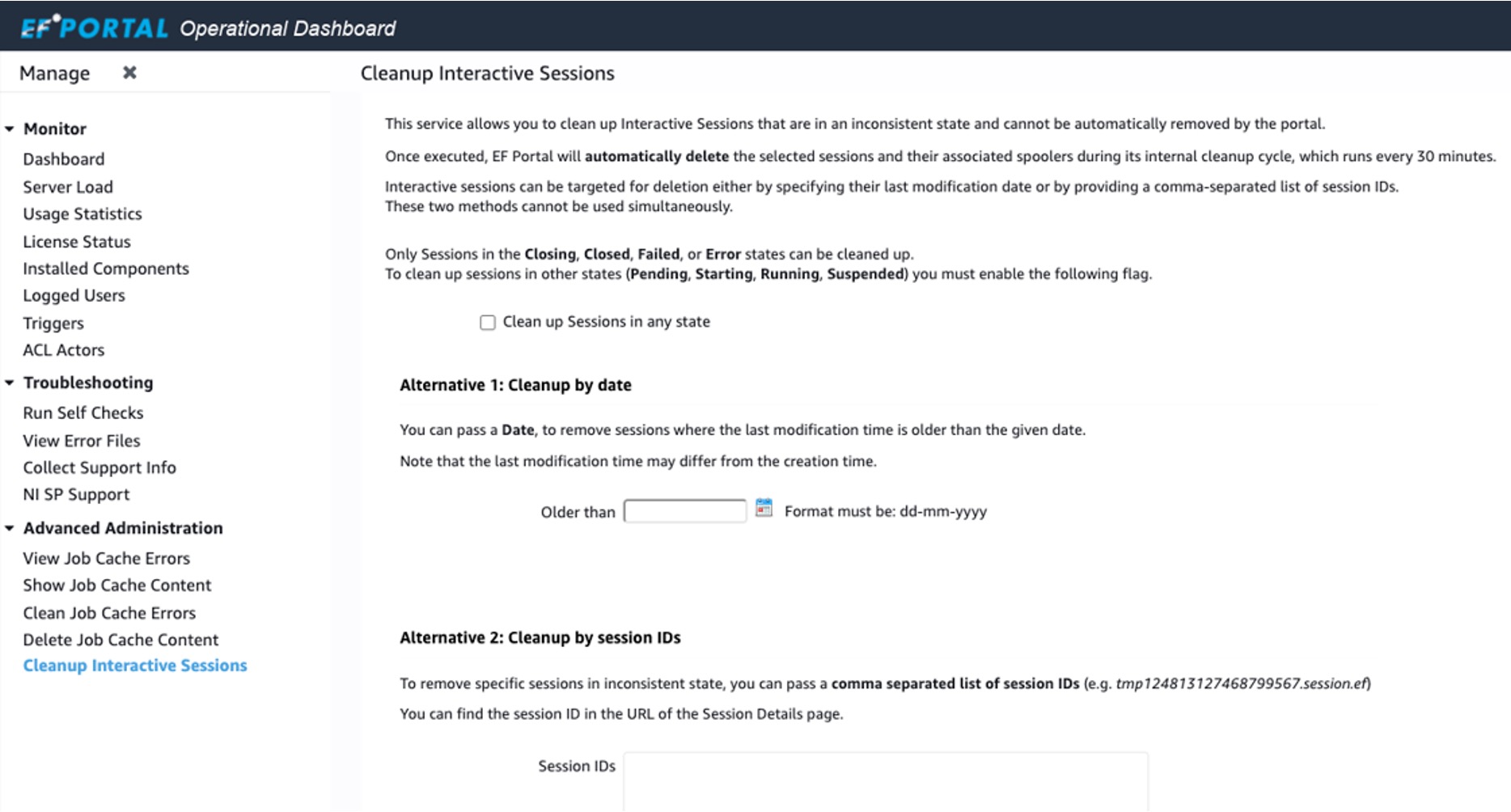
New Services to Manage VDI Sessions
We added a services to cleanup Interactive Sessions and moved the Job Cache management services into an Advanced Administration section:
Other Features and Improvements
We have added a number of other enhancements:
- VDI: Show DCV error message in the session log if DCV session start fails e.g. related to missing license
- VDI: Added automatic closure of interactive sessions if the underlying job or delegate session remains in an unknown state for a configurable period
- Slurm Plugin: Improved job status mappings with additional states
- Slurm Plugin: Enhanced error reporting for failed interactive job submissions
- LSF Plugin: Show data for up to 8 GPUs per node in the Hosts view
- Improved automatic redirection to the login page when the web session expires
- REST API: Improved auditing and logging of REST calls
- REST API: The REST token creation service can be configured to output only the token value
Changes / Fixes / Upgrades
Following changes and fixes were applied:
- Web Terminal now connects via HTTPS by default
- Operational Dashboard: Job Cache monitor services have been moved into the Advanced Administration navigation folder
- Slurm Plugin: Refined parsing of host states to ensure nodes in a drain state are not treated as active
- Added setting
INTERACTIVE_*variables in session starting hook for other hooks to use - File Manager: Updated utility libraries to ensure compatibility with
/bin/shshell - Auditing: Logout due to session expiration is now logged as a
[LOGOUT]event - File Manager: Improved compatibility of jQuery code used for Close button