
EF Portal 2026.0 is out with a powerful new Configuration Editor, Real-Time Notifications, enhanced Administration Features and new Showcases!
We’re proud to announce the release of EF Portal 2026.0, now available for deployment.
This release represents a significant step forward in making EF Portal easier to operate and administer at scale. From a brand-new powerful browser-based configuration editor to real-time in-portal alerts, EF Portal 2026.0 gives administrators more control, more visibility, and less reason to ever touch the underlying file system directly.
What’s new in 2026.0 in a nutshell:
EF Portal 2026.0 puts administrator productivity front and centre, reducing the need for file system access, surfacing the right information at the right time, and delivering the operational polish that complex HPC and VDI environments demand.
Transition to EF Portal
If you’re using EnginFrame, it can be very beneficial transition to EF Portal, the next evolution of the powerful HPC and VDI portal platform. Built on the same code base as EnginFrame, EF Portal offers a familiar installation process, consistent user experience, and exciting new features designed to enhance productivity and performance. As part of NI SP’s commitment to supporting EnginFrame customers, we offer free migration options and ongoing support to ensure a seamless upgrade experience.
Ready to try EF Portal or upgrade EnginFrame to EF Portal? Contact us for support.

Upgrading to EF Portal 2026.0
EF Portal upgrades are non-disruptive: running jobs and active DCV sessions remain unaffected throughout the process. For a smoother upgrade process, you can refer to our dedicated upgrade guide for validation steps, dry-run best practices, and handling of customised files.
⬇ Read full “What’s New in EF Portal 2026.0” below ⬇
What’s New in EF Portal 2026.0
(PDF Version: What’s New in EF Portal 2026.0)
EF Portal Web Configuration Editor
The Web Configuration Editor service that enables administrators to modify configuration parameters and files directly from the portal, without accessing the underlying file system.
The service also provides built-in validation of the configured settings.
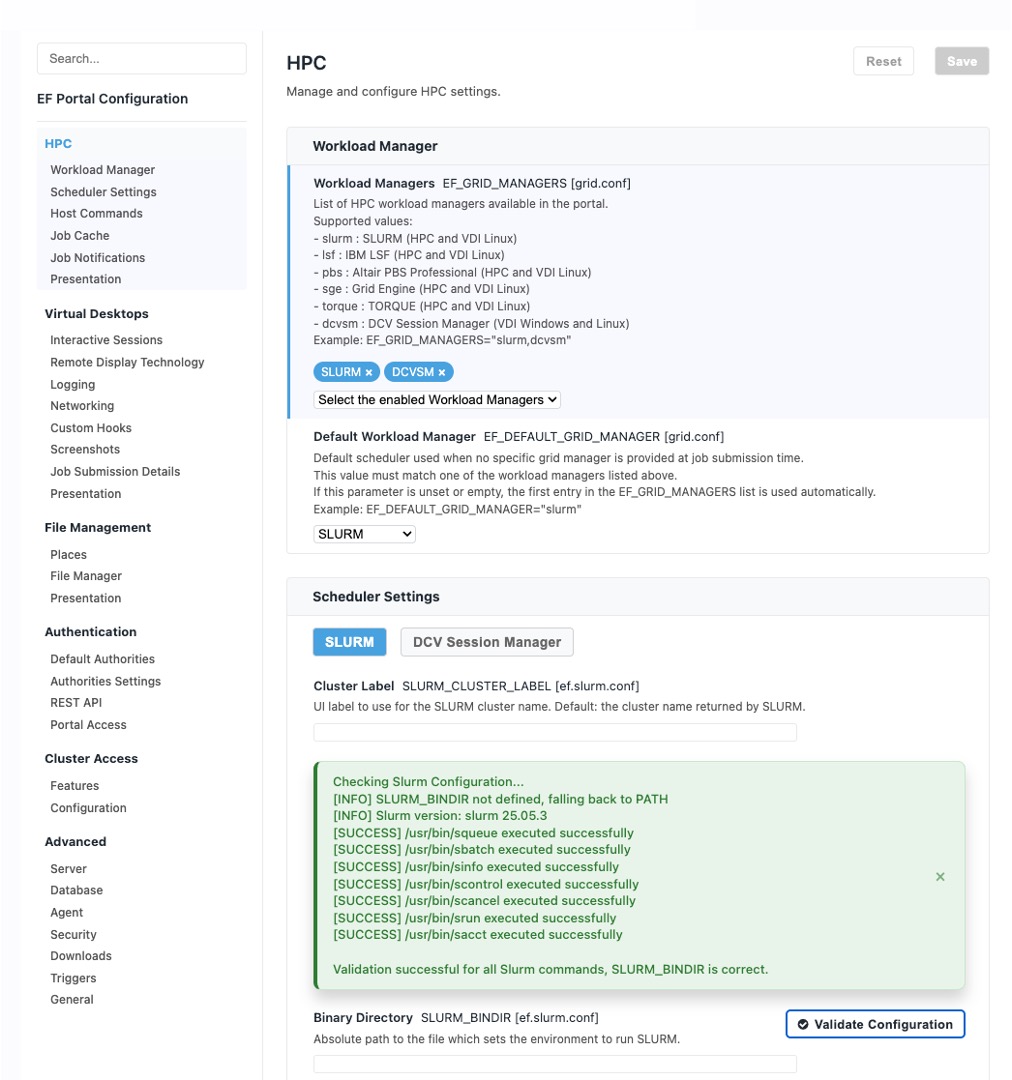
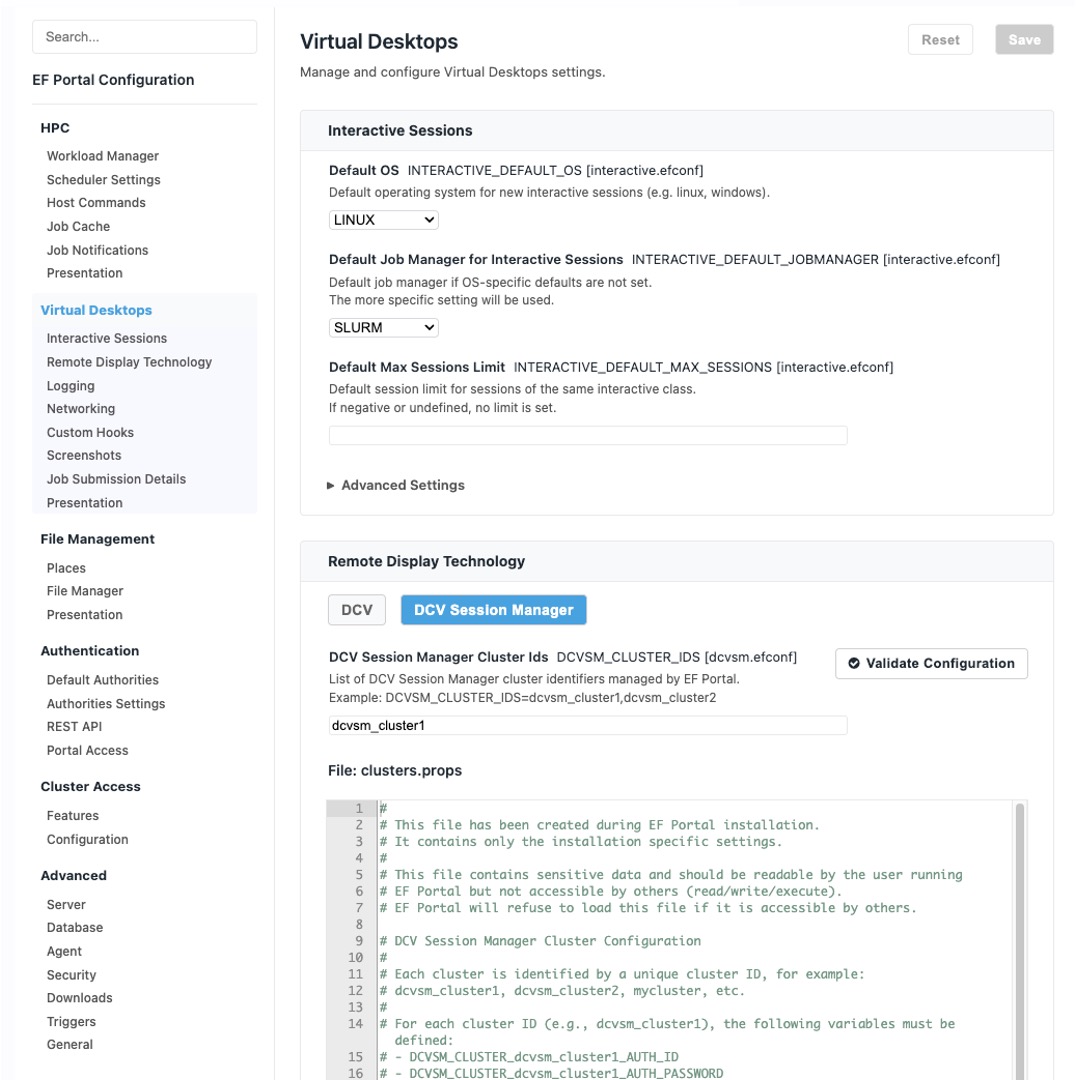
With the new configuration editor, you can easily enable additional schedulers or session managers, adjust their specific parameters, and perform live validation to ensure the configuration works as expected.
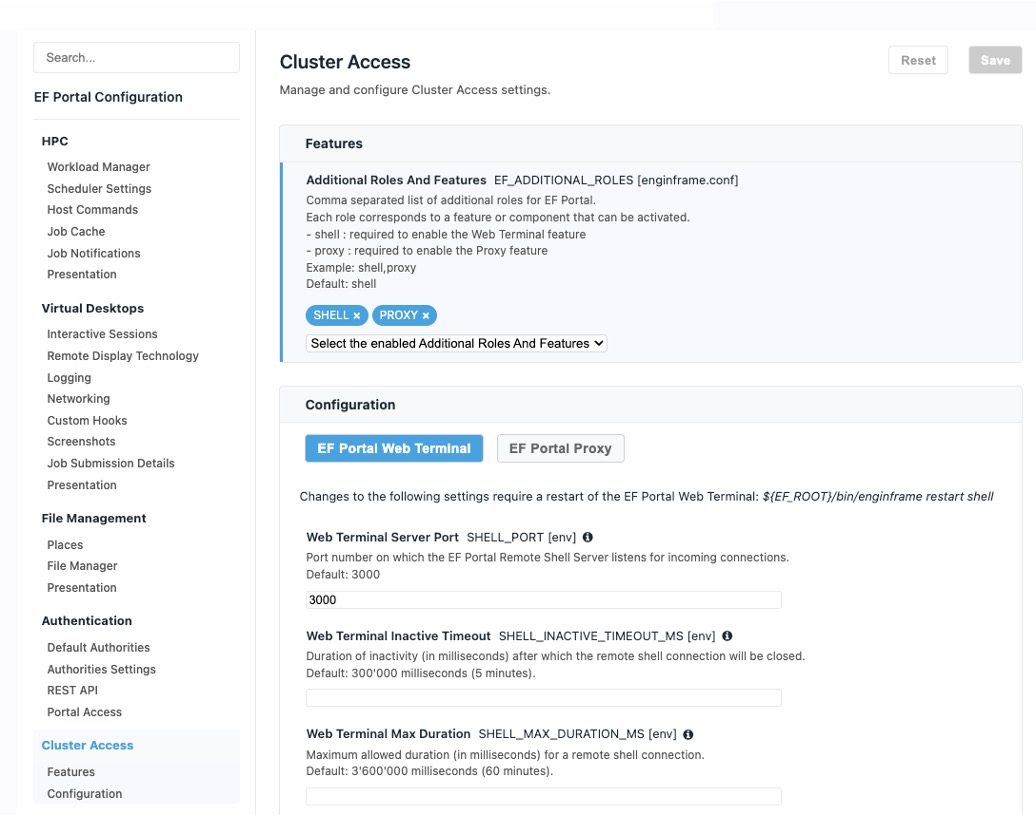
It’s possible to easily enable, disable, and configure the Web Terminal and Proxy features.
Live validation of misconfigured parameters: the configuration editor immediately highlights invalid values so you can spot and correct issues before saving.
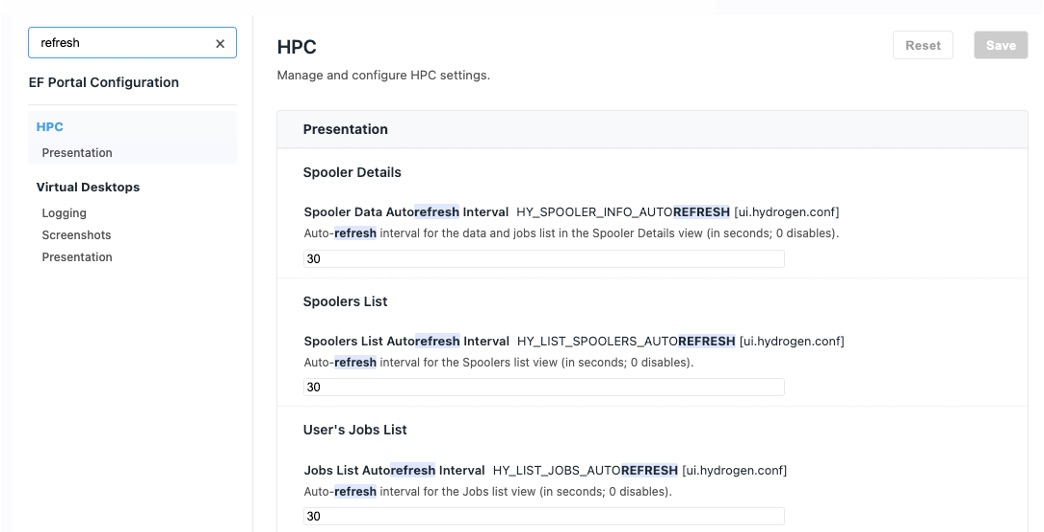
With the new search feature, you can quickly look through all configuration parameters to find what you need, whether it’s the parameter that controls the auto‑refresh period of the tables or any other feature you’re looking for.
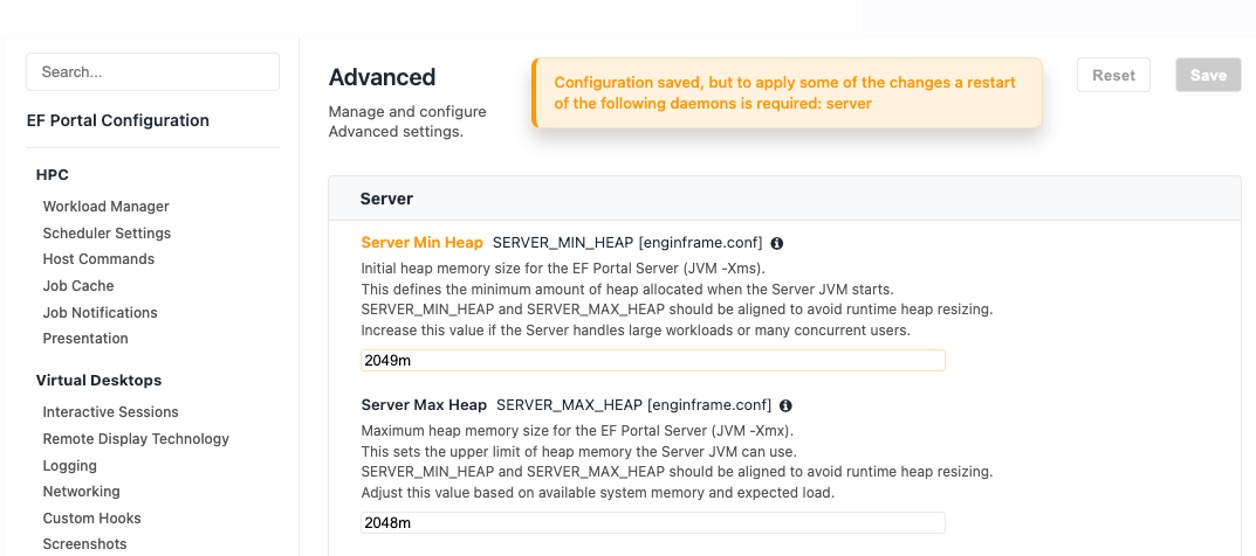
Parameters requiring a server restart or a daemon restart are highlighted, and they remain marked until the restart is performed.
Real-Time Notification System
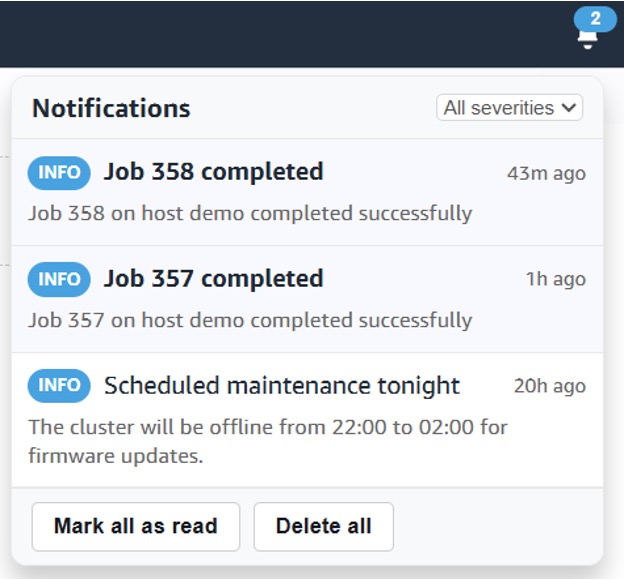
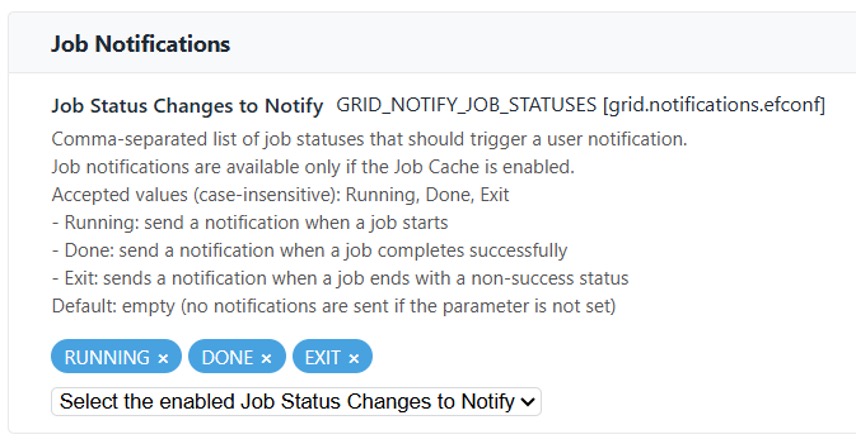
The new in‑portal notification system delivers instant messages with clear severity levels, read/unread states, role‑aware visibility (RBAC), multi‑tenant scoping, and a consistent, accessible UI.
Beyond system status updates, it also surfaces configurable job status notifications so teams can follow lifecycle changes in real time. Admins can publish notifications using our out‑of‑the‑box Bash and JavaScript tooling for easy automation and integration.
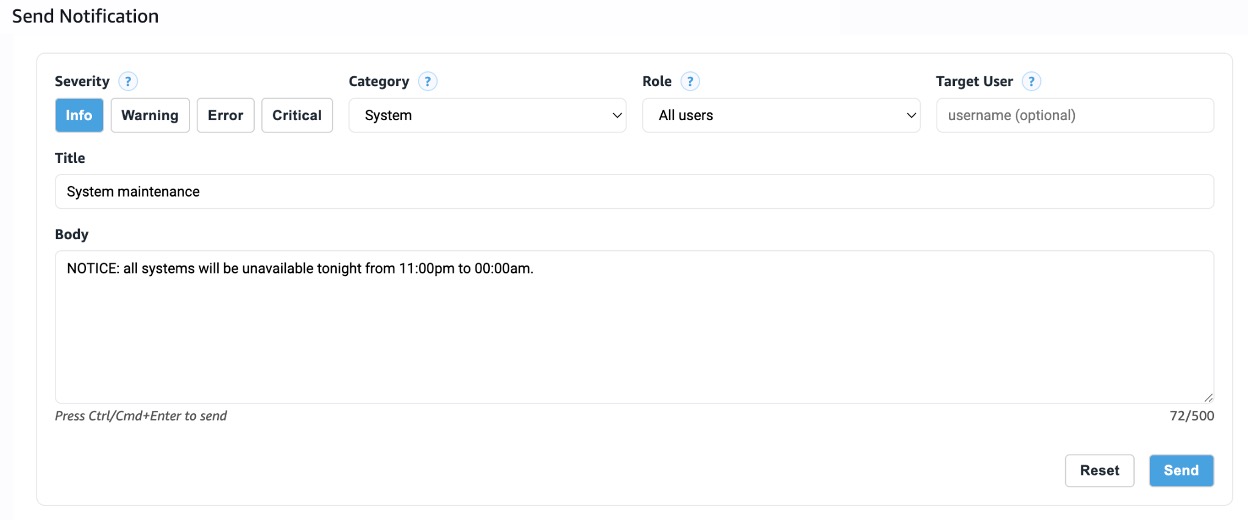
Administrators can also send custom notifications to all users in a role or to specific users through a dedicated UI.
The notification system behavior can be configured in the new EF Portal Configuration Editor.
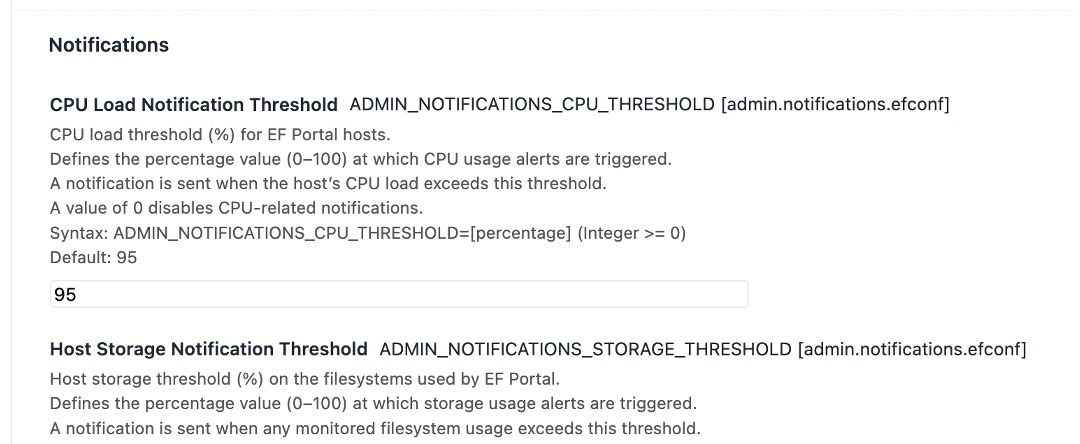
Thresholds for system notifications:
File Manager Places Editor
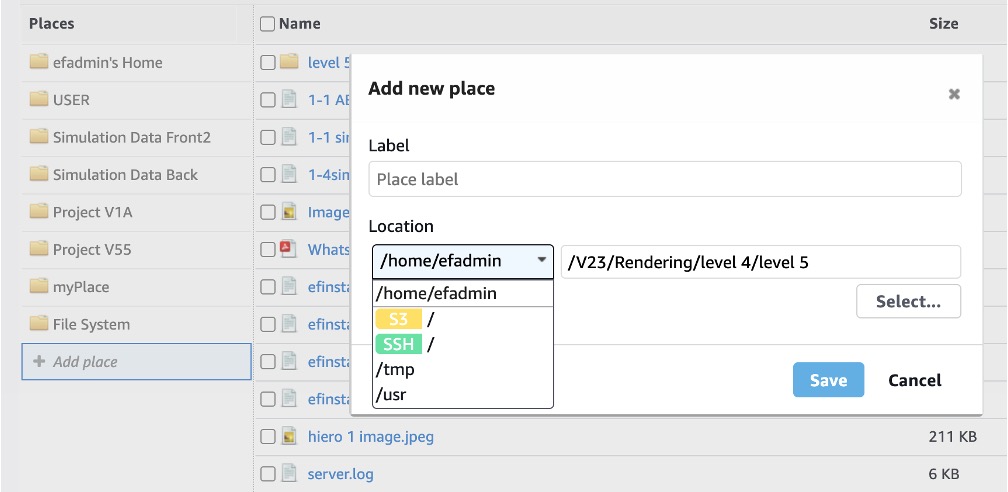
File Manager user interface now enables users to add, modify, remove, and sort their places. This allows them to easily organize their data into folders, projects, local and remote data stores.
The Places Editor supports file, ssh and s3 locations. Places can also conveniently be added via the Remote File Browser accessible via the “Select” button.
Here is a screenshot of the Places Editor interface:
Log File Viewer
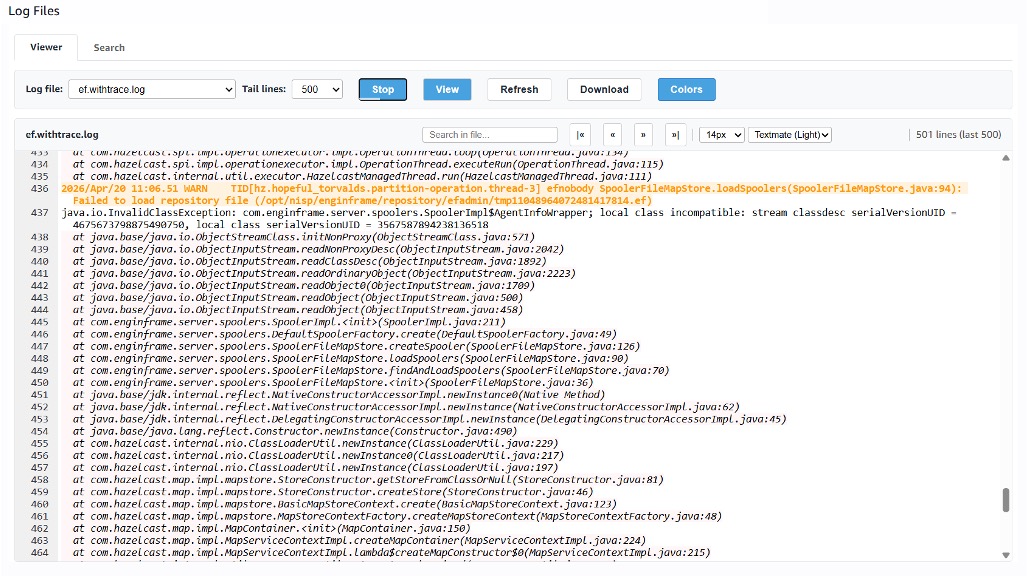
The new Log File Viewer in the Administrator Operational Dashboard offers
- Themed log file viewer integration
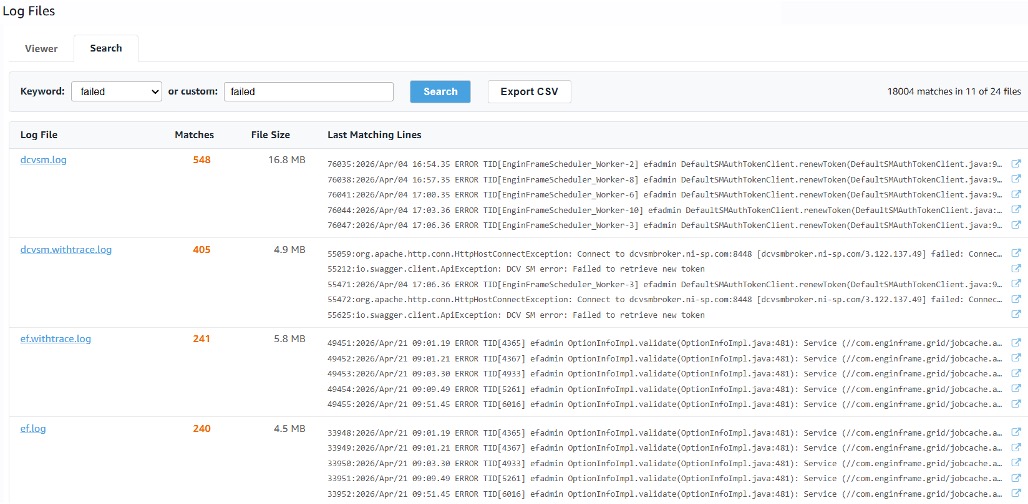
- Cross-file search with navigation and default keywords
- Direct link to search matches
- Tail mode with auto-refresh
- Log level color coding
- Multi-host support
- Cross-file keyword search with CSV export
Screenshot including enabled tail-mode and color coded errors of a log file:
Screenshot of matches for a predefined keyword with direct links to the location:
Other Features and Enhancements
We have added a number of other enhancements to EF Portal:
- Technology Showcase: Added a comprehensive REST API demonstration to include practical use cases utilizing both EFPClient and cURL
- Technology Showcase: Added implementation examples for creating new notifications using both JavaScript and Bash scripts
- Operational Dashboard: The CPU Load and JVM Usage widgets now display data for all servers in an EF Portal Enterprise installation
- Operational Dashboard: Introduced a viewer for Release Notes
- Slurm Plugin: Improved job status mappings when ‘sacct’ is used to interact with the scheduler
- Slurm Plugin: Added support for compact nodelist format
- Grid Plugin: Always use the host timezone offset for job submission to ensure the correct time is shown in the UI
- VDI: Link job ID in Session Details to the underlying Job Details page
- Service Editor: Preserve the scroll position of the options properties
- Service Editor: Show a description and a tooltip for each option widget
- UI: Show the pending reasons in the Jobs Details page
- UI: Display the cluster label in Host View when configured
- UI: Preserve the selected items in a list across refreshes
- UI: Introduced support for searching jobs by owner in the Jobs List
- UI: Disable the submit button after a service is submitted to prevent duplicate submissions
- UI: Each navigation menu item now exposes a CSS class (ef-nav-id-) so that customers can target individual menu entries with custom CSS
- Applications / VDI: Added possibility to customize refresh interval in the List Services and List Interactive Services pages
- File Manager: Compute place name if description is missing in ef.places
- File Manager: Added configurable parameter to permit to follow symlinks outside the virtual root (vroot)
- File Manager / RFB: Display base place path in the location bar
- File Manager: Enable up arrow leading to parent folder
- Remote File Browsing: Save the last visited folder when it is loaded from a profile
- Authentication: Added configurable parameters for AD/LDAP filters
- Authentication: Added possibility to configure the URL to redirect after a logout
- Core: Improved tag with the newWindow attribute to open the target page in a new window or tab in the browser
- REST API: Added new service to list available tokens for the logged-in user Improved error reporting for Ajax service calls
- Improved independent control of EF Portal daemons via the ‘enginframe’ startup script
- LSF Plugin: Allow GPU info parser to handle non‑numeric UT/MUT values
- LSF Plugin: Improved OS compatibility by initializing the execution environment through a configurable shell
- Job Cache: Improved handling of duplicate job entries when cluster IDs are missing or inconsistent
- PBS Plugin: Improve parsing of grid:execution-host GridML tag
- PBS Plugin: Added support for submitting interactive sessions on OpenPBS 23.06
- Hosts Info: Quick Commands are now shown also for Applications and VDI Administrators
Changes / Fixes / Upgrades
Following changes and fixes were applied:
- UI: Added configurable auto-refresh for the Jobs List and Spoolers List tables
- UI: Changed the default Jobs List ordering to descending by submission time
- Slurm Plugin: The “dcv2” feature is no longer required for interactive sessions
- Slurm Plugin: Added optional SLURM_INTERACTIVE_FEATURE parameter to specify
- custom constraints for interactive sessions
- DCV SM Integration: Session Recovery is now disabled by default
- Upgraded Apache Tomcat to version 9.0.115
- Upgraded Apache Derby to version 10.15.2.0
- Upgraded Apache Log4j to version 2.25.4
- Upgraded Apache Commons FileUpload to version 1.6.0
- Upgraded Apache Commons IO to 2.19.0
- Upgraded Apache Commons Lang to version 3.18.0
- Upgraded Apache Commons Logging to version 1.3.5
- Upgraded Apache Commons BeanUtils to version 1.11.0
- Upgraded AWS SDK for Java to version 2.40.17
- Upgraded C3P0 to version 0.12.0
- Upgraded SLF4J to version 2.0.16
- Upgraded Swagger UI to version 5.32.0
- Upgraded SnakeYAML to version 2.6
- Upgraded Swagger JAXRS2 to version 2.2.45
- Upgraded Node.js to version 22.22.2
- Upgraded Node.js modules used by Web Terminal and Proxy
- Removed Spring Framework dependency