
vs

PARSEC vs DCV: HOW DO THEY COMPARE?
Value-for-money
DCV offers great performance at attractive pricing & licensing model: from subscription to perpetual floating licenses, DCV covers all needs.

90$

ca. x4 higher
Yearly subscription cost per user
(standard version, including GPU support)

DCV can simultaneously handle up to 4 monitors in 4K with high-accuracy YUV 4:4:4 colors.
Outstanding performance & image fidelity
DCV leverages GPU-based encoding and a efficient secure transport protocol that ensures crisp image quality and low latency. DCV consumes less bandwidth than competing solutions.
VFX-ready production workflows
DCV seamlessly serves hundred thousands of enterprise and studio desktops every day. DCV supports state-of-the-art visualization and production pipelines with session persistence, deterministic performance under load, and full security & network control.
DCV is built for production, not just interaction.
Creative teams on mixed OS setups benefit from DCV’s cross-platform consistency.
Client & OS support
DCV offers native clients for Windows, macOS, Linux, and even ARM devices. DCV also comes with a zero-install web client.
Run anywhere
DCV runs on-prem, in hybrid setups, or fully cloud-based (including free on AWS and other clouds) without forcing a specific architecture.
Everything can be local, no internet access required.

DCV works with your existing infrastructure, not against it.
DCV features a complete Wacom Bridge integration.
Seamless creative workflows
Supported by Wacom Bridge, DCV offers remote professional-grade pen workflows removing latency effects.
Support excellence and strong development
DCV expert-level support enables fast turnaround times in case of questions. DCV is being continuously developed and improved by AWS teams.


“DCV enables streaming digital content creation applications so artists can jump into their tasks without launching a desktop.”
Michelle Brenner, Netflix Senior Software Engineer, March 2022
SEE HOW FILMLIGHT TRUSTS DCV
FOR THEIR REMOTE COLOR GRADING SOLUTION
“Traditional remote desktop solutions fail to deliver the responsiveness required for color grading. FilmLight REMOTE overcomes this by using DCV for UI control and an SRT-based JPEG-XS video stream to maintain real-time interaction and supporting multiple 4K UI monitors.”

More DCV customer stories are available here.
SEE DCV FOR YOURSELF
Using Parsec today? Test DCV on your existing workstation now.
SEE DCV FOR YOURSELF
INSTALL ON WINDOWS IN 1 MINUTE
DCV installs very fast on Linux systems too, with the provided all-in-one automatic DCV Installer.
DCV COMPARED TO OTHER REMOTE DESKTOP SOLUTIONS
DCV

RGS

Anyware

Parsec
Best-in-class image quality & responsiveness
(even in low bandwidth conditions)


Support excellence & fast response times
Favorable pricing & license model
Strong multi-user collaboration features
Wide support for artist tools & devices
(pens & tablets, webcams, Wacom remote…)
DCV is built for professional VFX studio environments where performance must remain consistent across multiple users, high-resolution displays, and constrained networks. It enables shared GPU usage, strong Linux and HPC integration, and full control over infrastructure, whether on-prem or in the cloud, without relying on external brokering services. Parsec, however, is known for its support of gaming use cases, making it more suited to individual access and lightweight collaboration.
DCV RESOURCES
On Windows NICE DCV offers high performance remote 3D desktop access for:
- NICE DCV on physical Windows workstation or server with or without GPU
- NICE DCV in virtualized Windows VM without GPU or with vGPU or physical GPU attached
vGPU or virtual GPU are subsets of a physical nVidia Grid GPU or AMD GPU where e.g. 1GB, 2GB, … frame buffer can be allocated for the respective vGPU. The GPU rendering performance is typically distributed to the different vGPUs on a first come first serve basis.
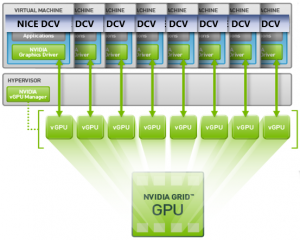
The vGPU is made available to the Windows OS in the Virtual Machine and NICE DCV via GPU-passthrough enabled by the hypervisor which could be e.g. Redhat-KVM, VMWare or XenServer. Our analysis of price performance of different nVidia GPUs provides additional background.
Installation of NICE DCV for Windows is done in 2 minutes by downloading and executing the installer – just try it yourself.
More information about the features of DCV for Linux: NICE DCV Product Codes and Features.
NICE DCV for Linux works in console mode for high-end remote desktop streaming of the console with or without GPU or many concurrent virtual desktops for different users without GPU.
The very efficient NICE DCV GPU sharing use case supports GPU sharing for e.g. 10-15 full-performant 3D Linux virtual desktops on physical Linux servers for different users sharing one or multiple GPUs, CPU cores and memory. This is a very cost- and resource efficient and straight-forward solution on physical Linux widely used offering full performance without the need for virtual machines or Grid licenses for every VM.
NICE DCV can launch different sessions for each 3D desktop sharing the GPU. Todays GPUs computation power is sufficient to support many concurrent users. GPU memory of 8GB to 16GB or even up to 48 GB supports many concurrent 3D Linux applications as often the consumption of GPU memory by the 3D applications is less than expected also for large models.
The GPU consumption of each 3D application can be analyzed with nvidia-smi which helps to understand overall GPU memory consumption (please find more background on nvidia-smi and price performance of different GPU types in our article Overview of selected nVidia GPU cards). Using virtual machines wastes resources compared to shared servers – we explain why in The hidden cost of VMs: Why They Waste Resources and How To Avoid It.
More information about the features of DCV for Linux: NICE DCV Product Codes and Features.
- NICE DCV Demo (Video)
- NICE DCV Product Codes and Features Overview
- What is Remote Desktop Streaming and How to Optimize it
- Ready-Made AMIs on AWS Marketplace to kick-start your NICE DCV experience
- Comparison of NICE DCV and HP Anyware
- Comparison of NICE DCV and HP RGS
- Comparison of NICE DCV and NoMachine
- Set up DCV with Wacom Bridge in 1 minute